My work process
While each problem has it’s nuances, the overall trend of any research project follows a similar trajectory.
I treat user experience research as a continuous cycle of learning, sharing, and evolving. I don’t just run studies - I build bridges between product teams and their customers, turning data into direction and insight into inspiration.
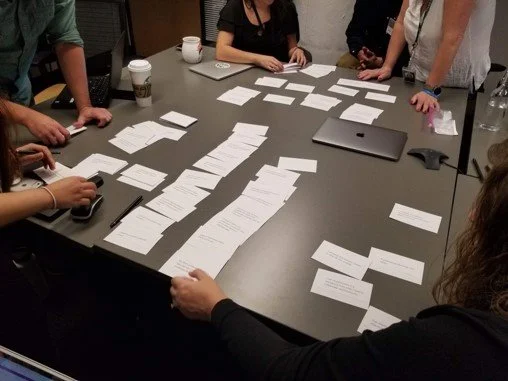
In October 2019 I facilitated two workshops with Starbucks. The goal of the workshops was to understand how employees currently use OneNote to collaborate with each other.
Step 1. Set the Context
Design without context is waste.
I start by understanding the environments in which people live, work, and interact with the product or problem. Questions I ask include:
Is there anything in a person’s environment that may impact how they’re able to interact with our solution?
How do the people want to interact with our solution?
How are they currently solving the problem without our solution?
Understanding the context reveals hidden constraints, enabling smarter, more empathetic design.
These are 5 spectrums that I used to help guide our team during a design sprint focusing on team collaboration.
Step 2. Gather existing knowledge
Why start from scratch when you can stand on the shoulders of giants?
Before running an experiment, I document:
What’s already known (internal research, stakeholder insights, competitive benchmarks)
What’s assumed but unproven
This step prevents duplication, aligns teams, and sharpens the focus of future research.
This is an image of the context and key findings from my external research review specific to Onboarding new users to an application.
Step 3. Reframe the problem
Foundational insights often live at the edges of the obvious.
I revisit the research problem from multiple angles, exploring tangents that may at first seem unrelated. This is where I uncover behavioral patterns, root needs, and unexpected opportunities - especially useful in early-stage or strategic work.
I used insights gained from reading the book Subliminal by Leonard Mlodinow and connected them to user psychology explained in the book Bottlenecks by David C. Evans to generate a list of foundational user needs for Microsoft OneNote.
Step 4. Choose the right method
One size doesn’t fit all. Research needs to flex.
I collaborate with PMs, designers, and engineers to select the right approach. My process balances rigor with reality:
Method selection (quantitative, qualitative, mixed)
Deadlines and Milestones
Participant sourcing
Ethical and inclusive experiment design
While collaboration is critical, I own this process and the execution end-to-end. I will recommend methods to the team based on the problem, decisions the team and stakeholders will need to make based on the results, and the time available to conduct the experiment.
Qualitative and quantitative research naturally fuel each other. For most research studies, it’s best to include both methods to get the answers you need.
Step 5. Execute the research
Research is a team sport.
Whether it’s interviews, surveys, or diary studies, I invite teammates to join as notetakers or observers. I specialize in mixed-methods research to tell the full story - balancing qualitative nuance with quantitative confidence.
This is an example of a usability study readout from an experiment of the Kitsap Library home page.
Step 6. Synthesize & Analyze
Insights mean more when they’re shared.
I facilitate collaborative analysis by:
Sharing notes, artifacts, and recordings as participant privacy allows
Creating synthesis workshops and walkthroughs
Encouraging questions and challenges
My goal: clear, actionable insights that everyone can rally behind.
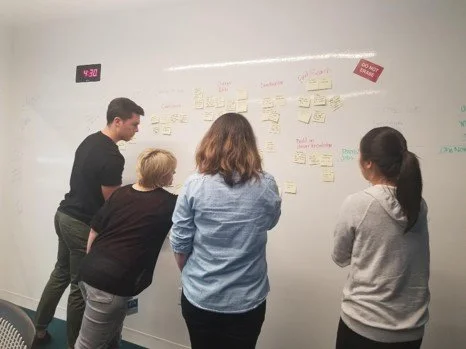
Design sprints work best when there are a diverse set of perspectives in the room. In the design sprint above I worked with program managers, designers, and developers to explore team collaboration in OneNote in Teams.
Step 7. Share the story
Research is only as powerful as its reach.
I tailor findings for different stakeholders and ensure they’re accessible beyond the immediate team. That might mean:
Emailing broader organization lists
Hosting lunch and learns
Posting on team channels or dashboards
Research doesn’t live in a vault - it lives in decisions.
This is an example slide from my presentation on a usability study of the way the OneNote team wanted to present the Sticky Notes and OneNote applications in the app stores.
Step 8 (optional). Make it memorable
Information should be as inclusive as the people we study.
I often repackage findings into different formats, including:
Slide decks
Infographics
Posters
Board games
Different formats reach different minds - and that’s the point. Making research accessible doesn’t have to be boring!
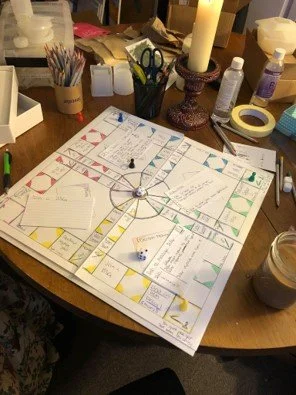
This is an empathy-building board game that I developed with support from a colleague at Meta (Facebook Marketplace). The goal was to encourage our colleagues to empathize with negative experiences reported on Marketplace by experiencing the events themselves.